1.28 - New Filing Interface
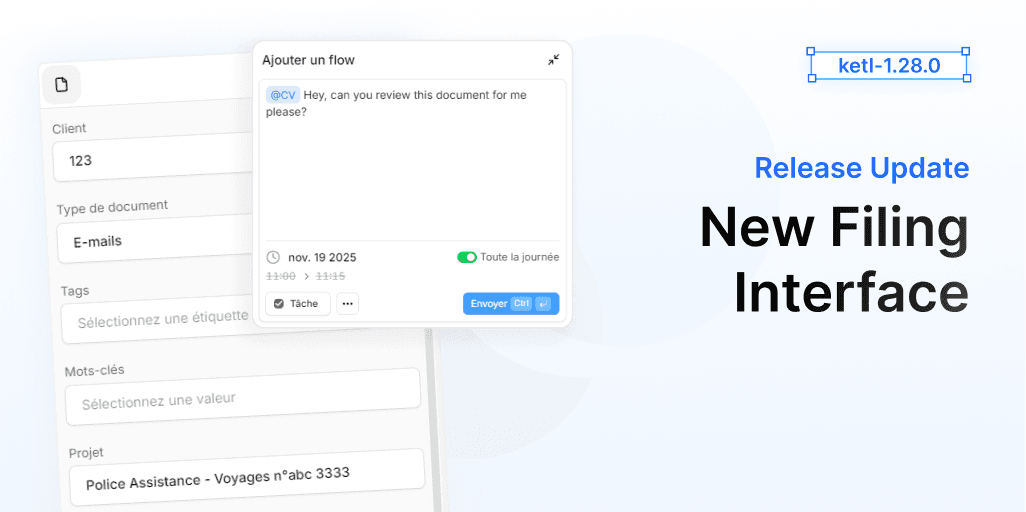
Today we are excited to announce the release of Ketl 1.27, which introduces a completely redesigned filing interface. This new interface is designed to enhance user experience, streamline workflows, and improve overall efficiency when managing documents.
Our priority was to create an intuitive and user-friendly filing process. We not just redesigned the aesthetics but also rethought the entire workflow to make filing documents faster and more efficient.
You will find brand new components and features thought to make your filing experience better than ever.
We also took the opportunity to introduce several improvements and fixes across the platform to enhance your overall Ketl experience.
Overview of this release:
- The interface of filing was completely redesigned for better usability and efficiency.
- The creation menu of a flow from filing was also redesigned for a more intuitive experience.
- The dropdowns in the new filing interface were improved to prevent cutoff issues.
- The AI suggestions in filing were improved to provide more relevant options.
- The user experience when selecting periods and dates in filing was enhanced for better clarity and ease of use.
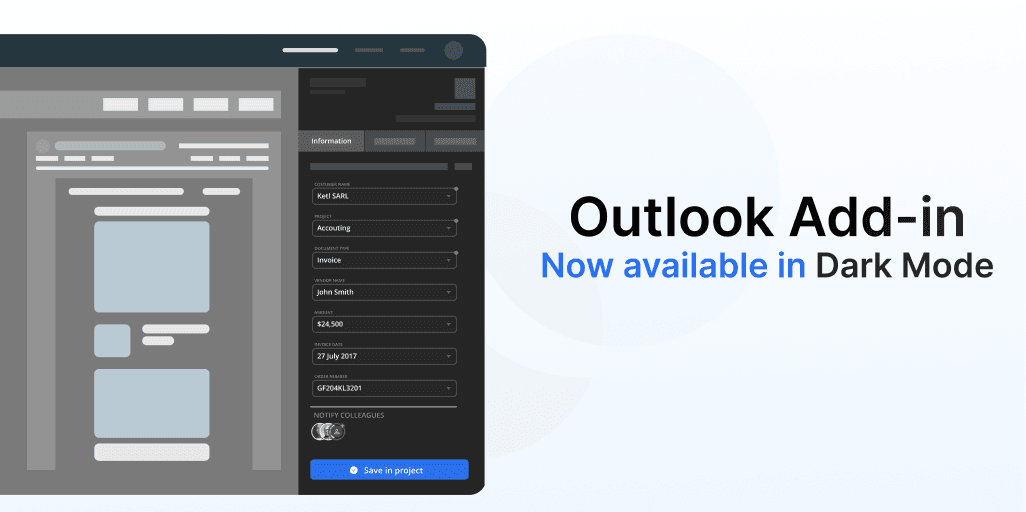
Our Outlook add-in now supports dark-mode. It will provide a consistent experience for users who prefer dark themes.
Not just that, we have also made several improvements and fixes across our add-in to make it more reliable and user-friendly.
This changes include:
- Redesigned flow creation from filing in Outlook add-in.
- New settings menu to manage add-in preferences more easily.
- Improved performance and stability for a smoother experience.
- Adapted the interface to better fit various screen sizes and resolutions.
Fixes & Minor Changes
- Added the ability to delete uploaded files directly from the filing upload window, without needing to open the inbox. This streamlines file management and saves time.
- Added option to select "All day" for flows durations.
- Added an indicator for the total duration of a flow where it includes the duration of its reactions.
- Added clearer path visibility when creating new folders, helping users confirm their location and reduce confusion during subfolder creation.
- Improvement Clearer path visibility when creating new folders, helping users confirm their location and reduce confusion during subfolder creation.
- Improvement Flows now show the full date and time instead of relative timestamps like “a month ago,” providing clearer and more precise information.
- Improvement Users can now hide default Home panels such as “Recent Documents” and “Recent Projects,” allowing a cleaner, more customizable workspace.
- Improvement Users can now open a filed document directly from the “Filing Complete” notification, streamlining workflows and reducing steps after uploading files.
- Improvement Redesigned the admin invitation section for better clarity. The “Invite Microsoft users” button is now separated and renamed “List active Microsoft users,” with clearer labels for inviting individual users.
- Improvement Deleting a file from the inbox no longer causes the entire inbox to close, allowing smoother and faster file management.
- Improvement Enhanced PDF split coloring scheme to make it easier to comprehend and more intuitive.
- Improvement Enhanced tag search performance and usability in general, should now be much better.
- Improvement Resolved an issue where titles of the panels in the home panel were shortened to three characters. Titles now display correctly in full.
- Improvement Text field suggestions in filing should now include only relevant options.
- Improvement Filter suggestions changed to not require exact capitalization - filtering is now fully case-insensitive, allowing matches regardless of letter case.
- Fixed an issue where filter suggestions required exact capitalization to appear in search results. Filtering is now fully case-insensitive, allowing matches regardless of letter case.
- Fixed an issue where filter suggestions required exact capitalization to appear in search results has now been Fixed. Filtering is now fully case-insensitive, allowing matches regardless of letter case.
- Fixed an issue with Project display name. It now correctly shows both client and project information.
- Fixed an issue where buttons in the sidebar were misaligned or misplaced on smaller displays or when using higher display scale settings.
- Fixed an issue where typing quickly in client fields under slow network conditions could result in missing characters.
- Fixed an issue with File history display. File history sometimes showed only the latest modification or displayed empty pages. History now loads correctly across all pages.
- Fixed an issue causing dropdown menu cutoff. Dropdown menus in the new filing interface were sometimes cut off or hidden. Menus now display fully and remain visible within the workspace.
- Fixed an issue that would incorrectly display the profile images of users when assigning a flow to a user from the document dock.
- Fixed an issue that prevented the drop down menu in search from closing automatically when changing “sort”.
- Fixed an issue where the filing drawer sometimes opened scrolled to the bottom. It now consistently starts at the correct position.
- Fixed an issue where missing user references in flows displayed “UNDEFINED” inside the user icon. The placeholder now shows a neutral icon or remains empty.
- Fixed an issue where removing an event from filing would sometimes display "Invalid date".
- Fixed an issue where after spliting a document we would display the old file in filing modal.
- Fixed an issue where sometimes the duplicates alert would say a duplicate is filed when it was not.